
Overview
This document contains steps to register Hosts to my Host Collection in Red Hat Satellite at U-M.
How to Register Hosts
- Log in to Red Hat Satellite at U-M.
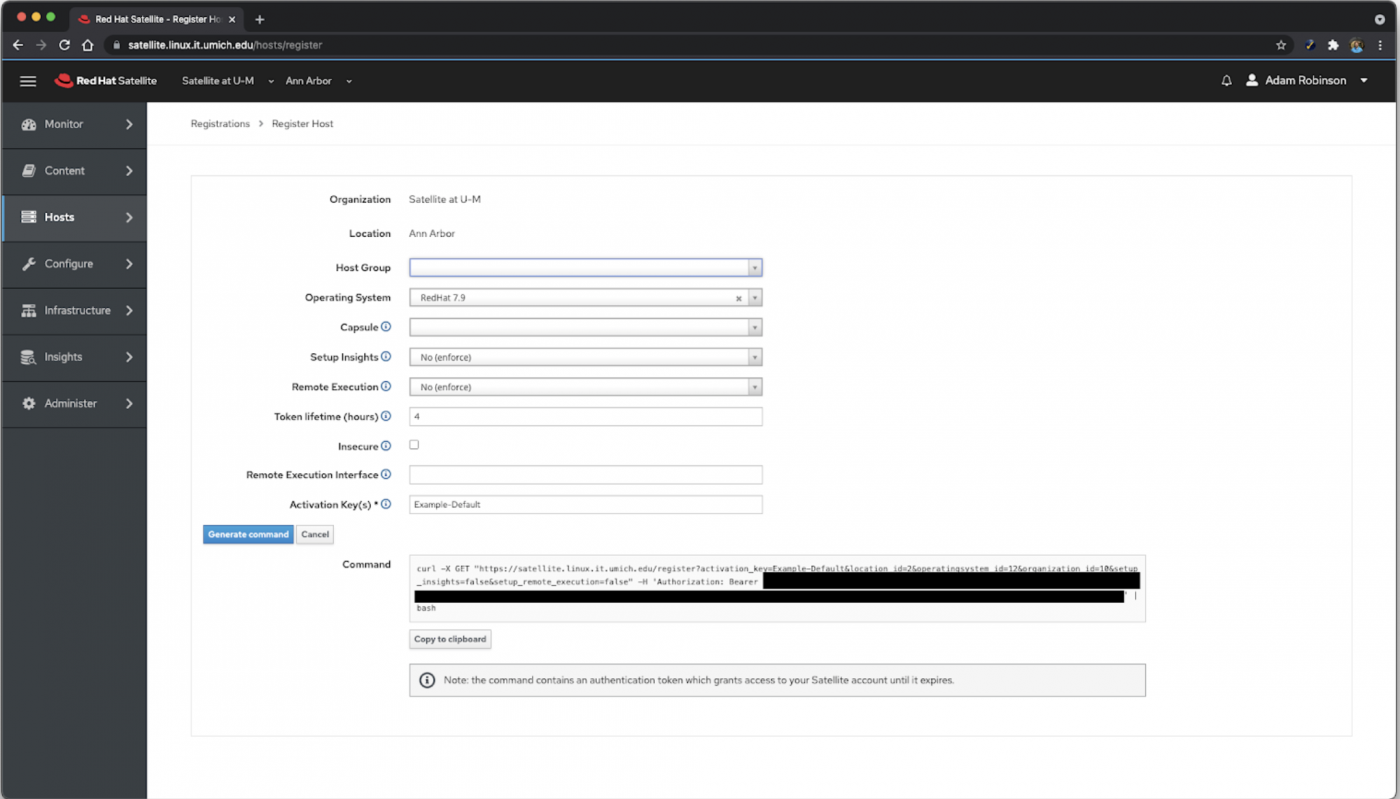
- Navigate to Hosts > All Hosts > Register Host.
- Select the operating system of the machine(s) you would like to register from the Operating System drop-down list.
- Select No (enforce) from the Setup Insights drop-down list.
- Select No (enforce) from the Remote Execution drop-down list.
- Enter the Activation Key(s) for the Host Collection you would like to add machines to in the Activation Key(s) field.
Notes:
- If you are specifying multiple keys, they should be separated by a comma.
- To create an Activation Key, refer to How to Create an Activation Key in Red Hat Satellite at U-M.
- Click Generate command.
- Copy the resulting command and run it on the Hosts you would like to register.
Notes:
- The Satellite server will authenticate with your unique ID upon sign-in to the Satellite server.
- The output contains an authentication token that can be used to access the Satellite server. Treat the information as sensitive data.
- By default, the command will expire after four hours. This can be adjusted by changing the value of Token lifetime (hours).
For more information, refer to Red Hat Satellite at U-M Documentation.
Last Updated
Friday, September 17, 2021