
Overview
The Pre-Award Officer Team Leadership can manage proposal complexity factors, including a "fail-safe" PR when no other Project Representative is assigned.
Contents
- Mange PAO Round Robin - Complexity Calculation
- Update PRs Ready for Assignment
- Update if a Sponsor is Complex
These activities are available to those with the ORSP-IT role.
Navigation
Role: ORSP-IT Home Workspace
Step-by-Step Procedure
Mange PAO Round Robin - Complexity Calculation
Use this activity to update the Round Robin calculation to consider complexity of a project (PAF) and review type when doing PR assignments.
The definition of "Complexity" can be updated by adding or subtracting predefined factors from the calculation. Factors may have thresholds that ORSP can define.
- Confirm the ORSP-IT Role is selected.
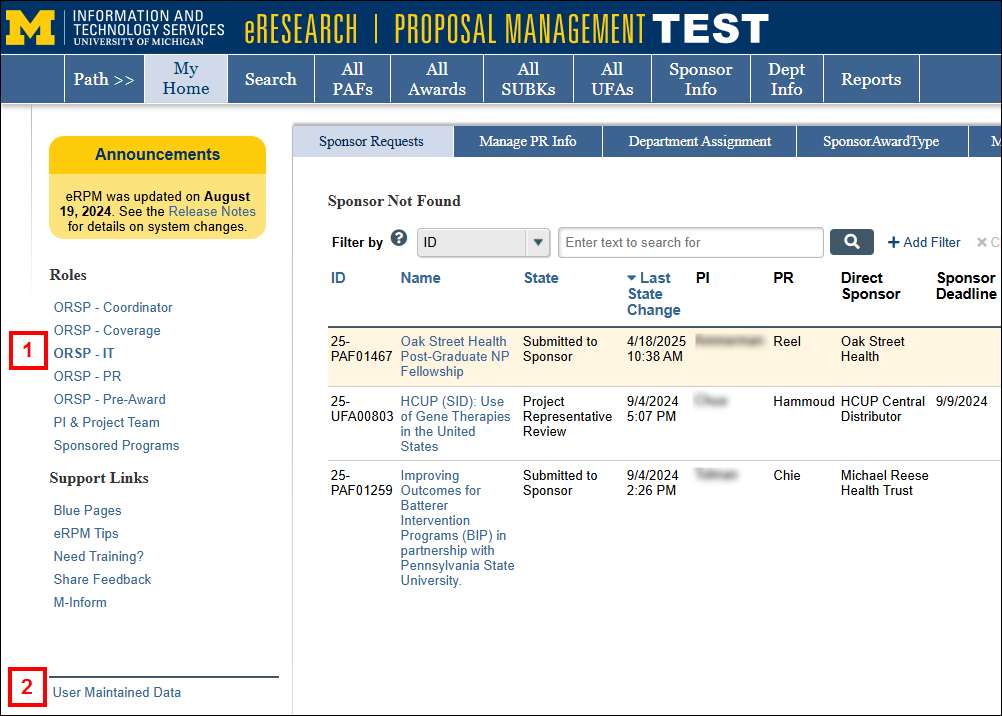
- Click the User Maintained Data link.
- Click the ORSP - PAO Round Robin tab.
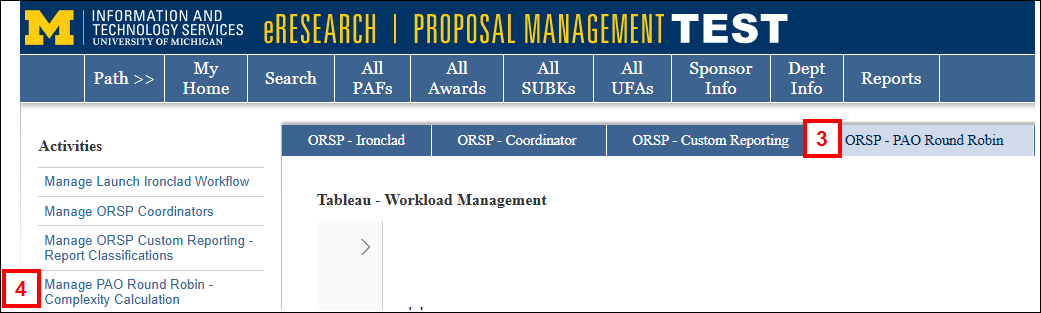
- Click the Manage PAO Round Robin - Complexity Calculation activity.
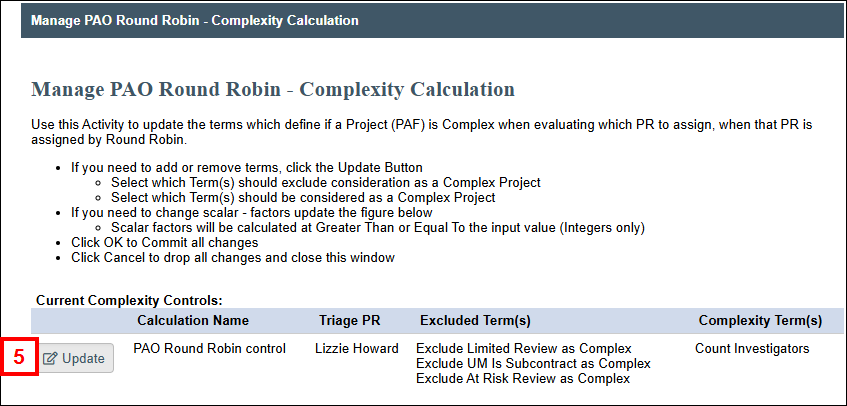
- Click Update under Current Complexity Controls.
- Click Update under Updated Complexity Controls.
Note This order is important for documenting changes in complexity terms as part of the Activity History.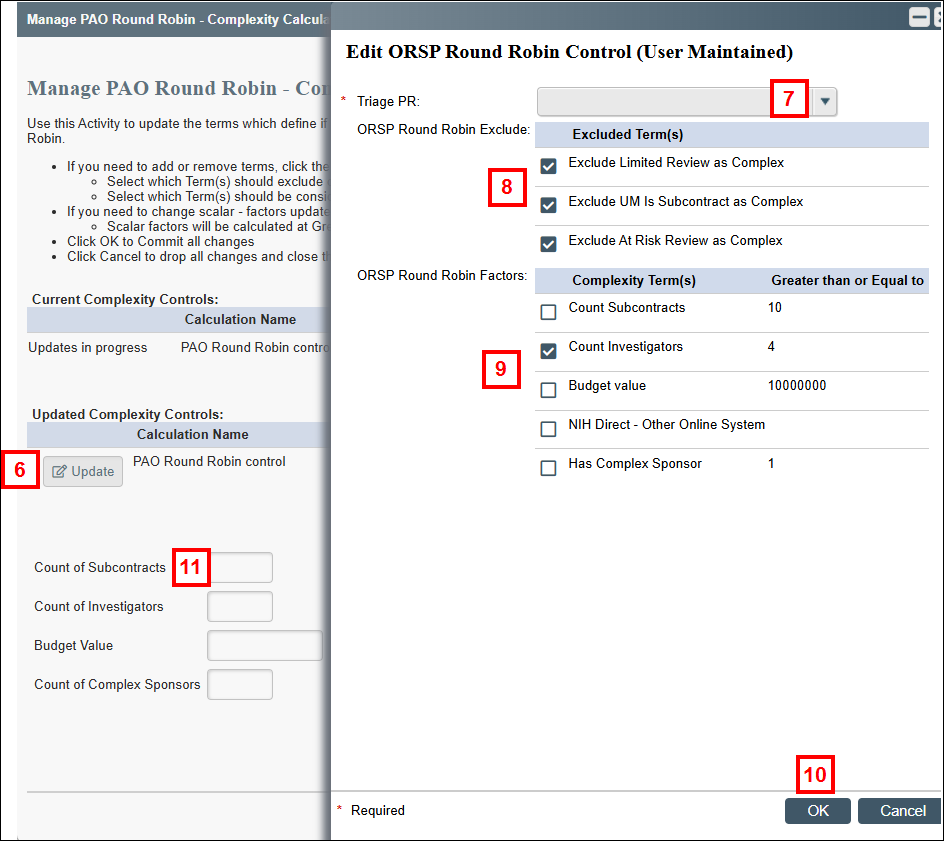
- Choose a person from the Triage PR dropdown menu.
- In the ORSP Round Robin Exclude field, select the Excluded Term(s). Uncheck any terms to not exclude.
- In the ORSP Round Robin Factors field, select the Complexity Term(s) to be part of the calculations. Uncheck any terms to not include.
- Click OK.
Notes- If a PAF is true for ANY selected Exclude Term at the time of evaluation, the PAF is marked/considered NOT COMPLEX.
- If a PAF is true for ANY of the selected Complexity Terms (and NONE of the Exclude Terms) the PAF is marked/considered COMPLEX.
- To update the Greater than or Equal to values (e.g., Count of Subcontracts >=10), enter a number (integer) for the following fields, as desired:
- Count of Subcontracts
- Count of Investigators
- Budget Value
- Count of Complex Sponsors.
Note The new values will be reflected once the activity is completed.
- Click OK to save your changes and close the activity.
Update PRs Ready for Assignment
Use the Manage PR Info tab to indicate that a Pre-Award PR is ready for assignment for Complex PAFs. Calculation of the PR to assign is a point-in-time, so removing a PR from “Ready For Assignment” will stop their being assigned by PAO Round Robin until they are marked “Ready for Assignment” again.
Note This does not impact the existing Manage ORSP Assignment from the Generate PR button used by Michigan Medicine, nor will a Round Robin PR be assigned if there is an existing PR on the PAF.
- Click Manage PR Info tab.
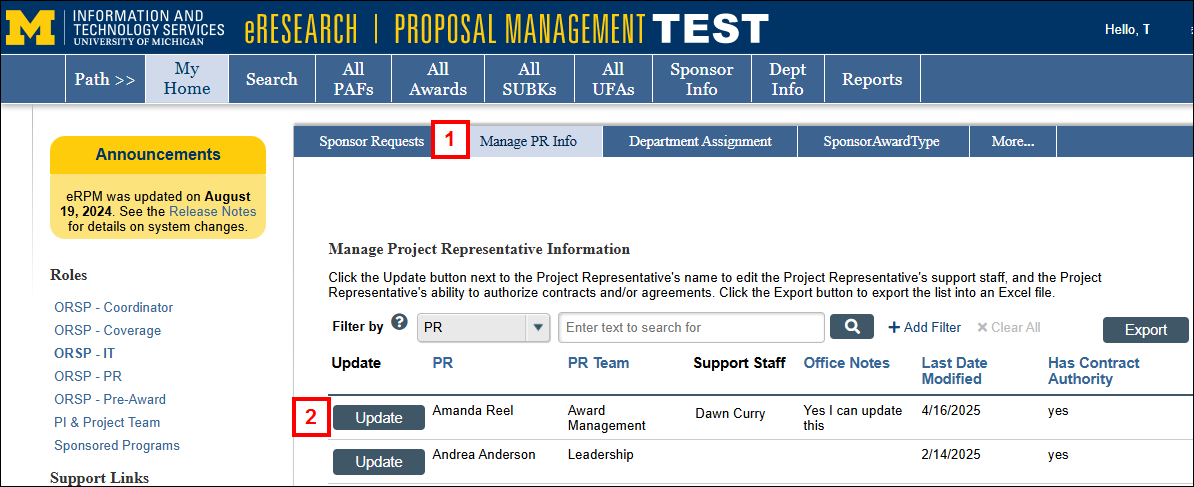
- Click Update next to the Project Representative’s name to edit the PR's support staff, and the PR's ability to authorize contracts and/or agreements.
Manage Support Staff
- Enter and select a name in the Support Staff field to add another support staff member.
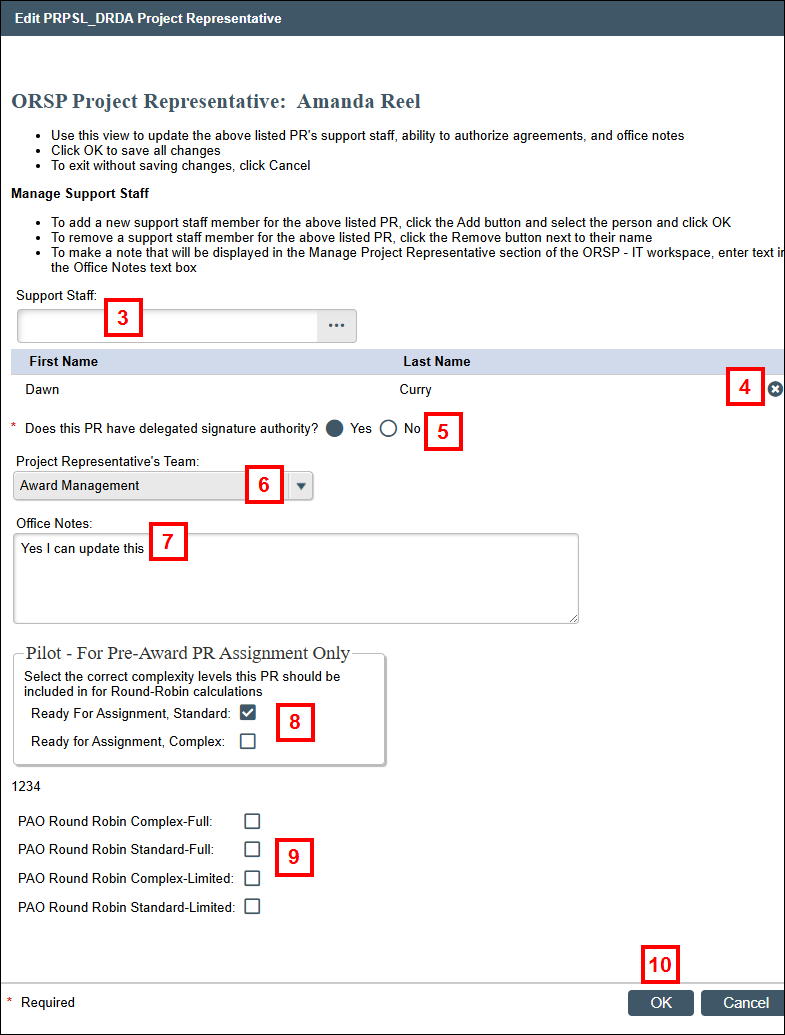
- If needed, click Remove to delete a support staff member.
- Click Yes or No to indicate if the PR has delegated signature authority.
- If needed, select the Project Representative’s Team from the dropdown menu.
- Enter or edit any Office Notes to be displayed in the Manage Project Representative section of the ORSP - IT workspace.
For Pre-Award Assignment Only
- Select the complexity levels this PR should be included in for Round Robin calculations: Ready for Assignment Standard, Complex, or both.
- Select the applicable PAO Round Robin calculation: Complex-Full, Standard-Full, Complex-Limited, Standard-Limited.
- Click OK to save your changes.
Update if a Sponsor is Complex
The existing Entity Profile Sponsor Information form has been updated to have a new attribute “PAO Sponsor is Complex” which is what is evaluated in the complexity calculations.
It is expected this will only be evaluated for Federal sponsors, as non-Federal sponsors are not expected to be entered on the PAF at the time a PR is assigned.
- Click the Sponsor Info tab.
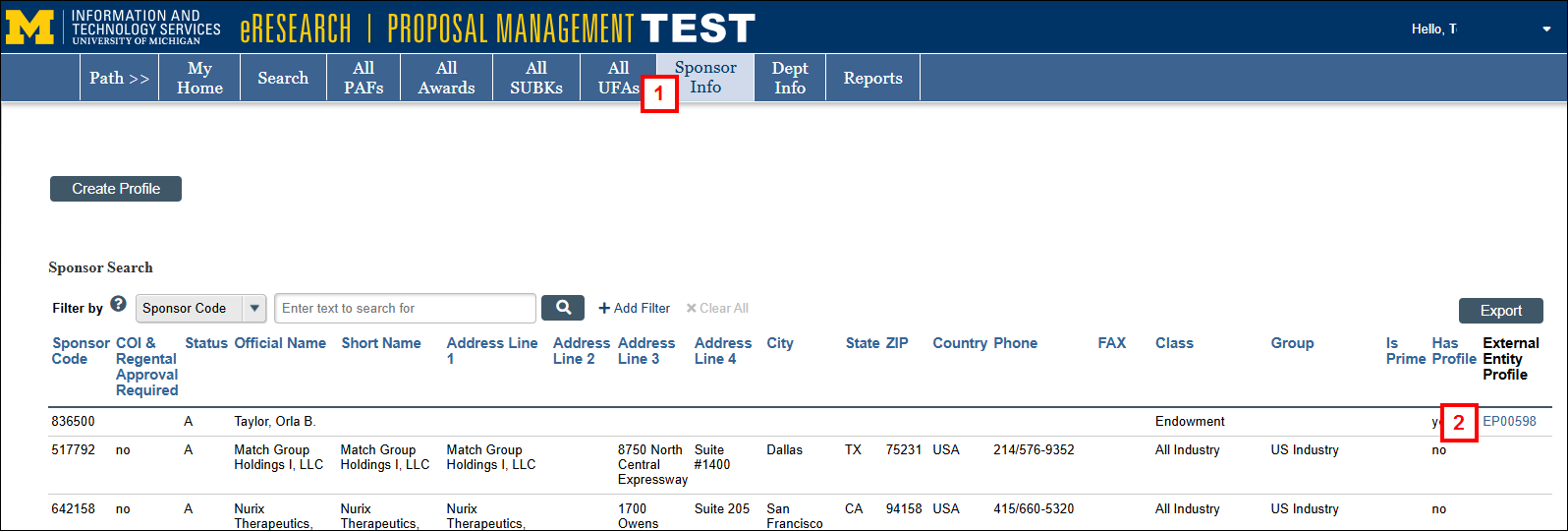
- Search for or locate the applicable sponsor, then click the External Entity Profile link.
- Click Sponsor Information under Manage Data.
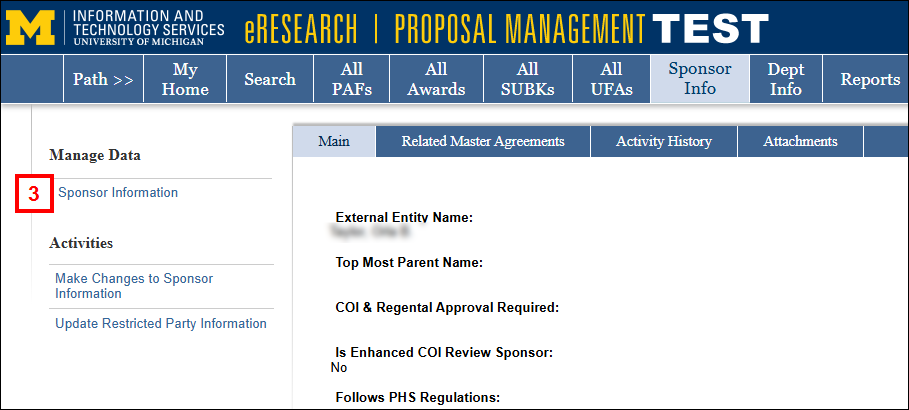
- Check the PAO Sponsor is Complex box.
Note This is evaluated in the complexity calculations.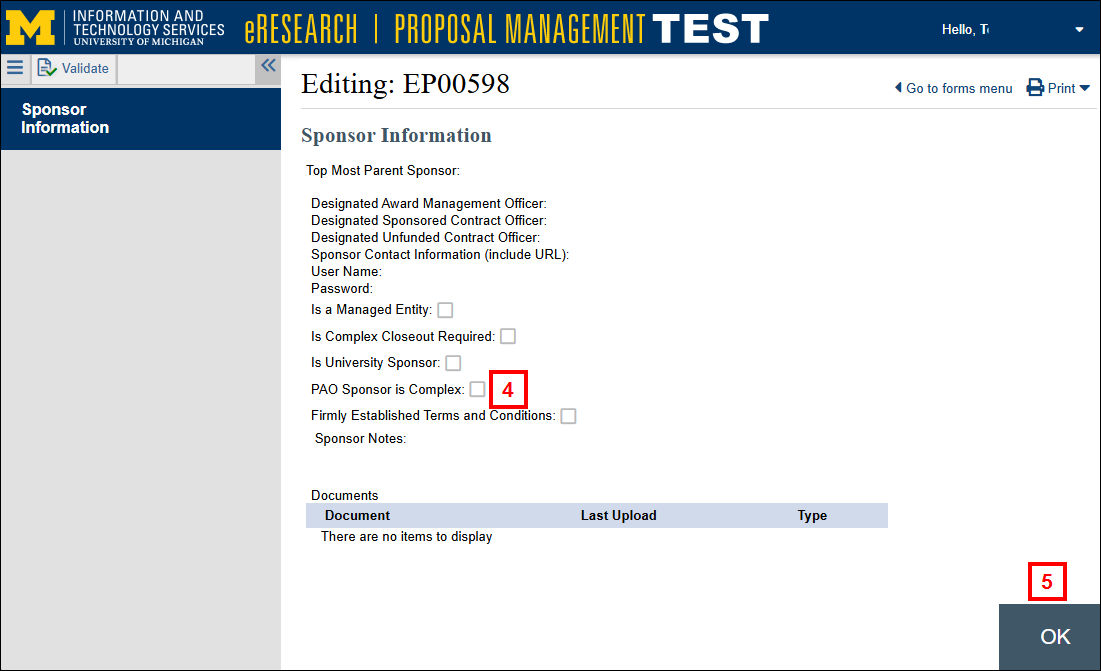
- Click OK.