
Overview
You can view charges in eRAM in two ways: the Charge Information tab or the ULAM Statement of Charges by Shortcode.
Protocol Workspace > Charge Information Tab
The Charge Information tab on the Protocol workspace lists information related to protocol charges and provides links to details about each individual charge identified on the protocol.
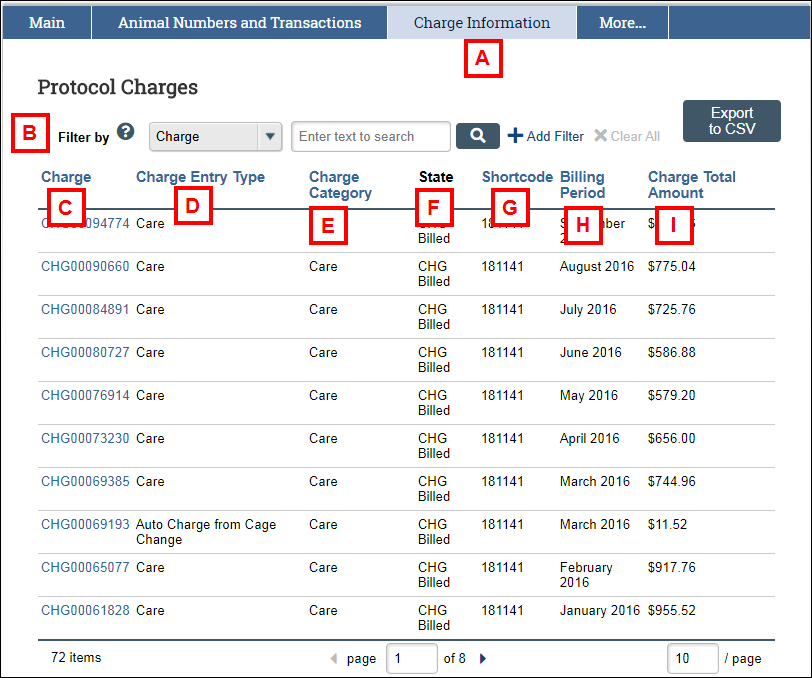
| Letter | Field | Purpose |
|---|---|---|
| A | Charge Information | Click this tab to view information related to protocol charges. |
| B | Filter by | Search for specific charges associated with the protocol. You can filter by by Charge ID, Type, Shortcode, Billing Period or Charge Total Amount. |
| C | Charge | Click the Charge ID link to view additional details about the charge. |
| D | Charge Entry Type | The Charge Type indicated on the protocol. |
| E | Charge Category | The category of the charge. |
| F | State | The state of the charge. |
| G | Shortcode | The shortcode used for the charge. |
| H | Billing Period | The billing period for the charge. |
| I | Charge Total Amount | The total amount for the charge. |
ULAM Statement of Charges (SOC)
There are two types of Statement of Charges email notifications sent each billing period to Shortcode Responsible Persons, Shortcode Managers, and Billing Viewers:
- SOC by PI – Statement of Charges by Principal Investigator shows all charges associated with the PI’s currently active protocols for the specified billing period. This includes charges using shortcodes owned by other PIs.
- SOC by SC – Statement of Charges by Shortcode shows all charges associated with shortcodes owned by the PI. This includes charges used by other PIs who are sharing the shortcode.
Note If the PI has not shared any active shortcodes with other PIs, the information displayed in each of the Charge Statements will be identical.
- When you receive the email notification that your Statement of Charges is ready to view, follow the link to eRAM to view it.
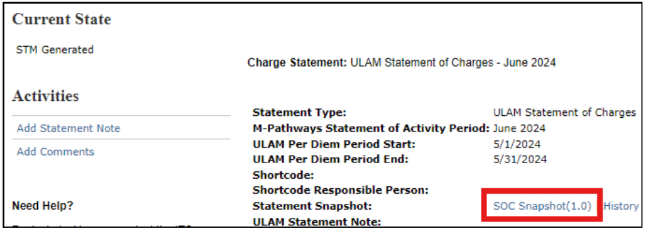
- To download your statement as a PDF or to Print it, click the SOC Snapshot link.
Last Updated
Wednesday, January 28, 2026